Switching carriers on a Pixel phone has become much easier thanks to eSIM support, especially for people who want faster activation without waiting for a physical SIM card.
The Pixel 7 pushed that flexibility even further by supporting both traditional nano-SIM cards and digital eSIM setups on compatible networks.
Because of that, questions around Google Pixel 7 eSIM often come up during carrier transfers, travel setup, or dual-line configuration.
1. Does the Pixel 7 Have eSIM? Quick Answer First
Yes, the Pixel 7 fully supports eSIM functionality alongside a physical nano-SIM card. Google designed the phone to support flexible carrier activation methods, including digital setup without needing to insert a removable SIM card at all.
The device supports dual SIM functionality and can store multiple eSIM profiles, giving users greater flexibility when managing personal, work, or travel lines.
Depending on carrier support and software configuration, the Pixel 7 can use a physical SIM and eSIM simultaneously, and some setups may also support dual active eSIM functionality.
Because service can be activated digitally without waiting for a physical SIM card, many users choose eSIM for faster carrier switching, international travel, and managing multiple phone numbers on a single device.
2. Google Pixel 7 SIM Explained in Simple Terms
The Pixel 7 supports both traditional SIM hardware and newer digital SIM technology, giving much more flexibility than older smartphones that only relied on physical SIM cards.
What Makes an eSIM Different from a Physical SIM
A physical SIM card is a removable chip inserted into the phone’s SIM tray.
An eSIM works differently because the carrier profile downloads digitally into the phone itself instead of relying on removable hardware.
That means eSIM can make it easier to:
- Activate service faster
- Switch carriers digitally
- Add travel plans remotely
- Use dual SIM functionality without carrying extra SIM cards
Why Google Built eSIM Into Pixel 7
Google expanded eSIM support to simplify modern carrier activation and improve dual-line flexibility.
The Pixel 7 was designed for situations like:
- Managing personal and work numbers
- Traveling internationally
- Switching carriers more easily
- Reducing dependence on removable SIM hardware
As more carriers move toward digital activation, eSIM support has become much more important across newer Android devices.
Dual SIM on Pixel 7: Can You Use Two Numbers?
The Pixel 7 is designed to handle more than one mobile line, making it a practical choice for users who want to separate different types of usage on the same device.
For example, you might keep a personal number on one line while using a second number for work. Others use an additional line for travel or as a backup network when coverage varies between carriers.
Within the phone’s settings, you can choose which line is used by default for calls, text messages, and mobile data. This gives you the flexibility to manage multiple numbers without carrying a second phone.
The exact dual SIM options available will depend on your carrier and configuration, but the Pixel 7 is well-suited for users who need more than one active line on a single device.
3. How to Activate eSIM in Pixel 7 (Step-by-Step)
Most eSIM setups on the Pixel 7 only take a few minutes when the carrier fully supports digital activation.
Connect to Wi-Fi First
A stable Wi-Fi connection is usually required before downloading an eSIM profile.
Weak or interrupted internet connections can cause activation failures during setup.
Go to the SIM Settings Menu on Pixel 7
To begin eSIM setup:
- Open Settings
- Tap Network & Internet
- Select SIMs
- Tap Add SIM
The phone will then begin the digital activation process.
Scan a QR Code or Download via Carrier App
Most carriers activate eSIM using either a QR code or their official carrier app.
After scanning or downloading the profile, the Pixel 7 installs the carrier information automatically.
Confirm Activation and Test Service
Once installation finishes:
- Restart the phone if requested
- Confirm the line appears inside SIM settings
- Test calls, texts, and mobile data
Some carriers may take a few extra minutes before full network service becomes active.
Read more: Unlock SIM Card: How to Unlock Your Phone for Full Network Access
4. How to Activate eSIM in Pixel 7 Pro (If You Have the Pro Model)
The Pixel 7 Pro follows nearly the same eSIM setup process as the standard Pixel 7 because both devices share similar SIM hardware and software features.
Activation typically involves:
- Connecting to Wi-Fi
- Opening SIM settings
- Adding the eSIM profile
- Scanning the carrier QR code or using the provider app
- Confirming activation
The Pixel 7 Pro also supports dual SIM functionality through:
- Physical nano-SIM + eSIM
- Dual eSIM configurations on supported carriers
Because the setup process remains nearly identical, most carriers use the same activation instructions for both Pixel 7 models.
5. Which Google Pixels Support eSIM? (Full List)
Google has supported eSIM across several Pixel generations, although available features can vary slightly depending on the region, carrier, and software version.
Pixel 3 to Pixel 6 Series
Many Pixel devices starting from the Pixel 3 include eSIM support, including:
- Pixel 3 / 3 XL
- Pixel 3a / 3a XL
- Pixel 4 lineup
- Pixel 5 lineup
- Pixel 6 lineup
Most of these phones support:
- One physical nano-SIM
- One eSIM profile
- Dual SIM functionality
Some features, like dual active eSIM, may depend on Android version updates and carrier compatibility.
Pixel 7 and Pixel 8 Series
Google expanded eSIM flexibility further on newer Pixel generations.
Devices in these lineups include:
- Pixel 7
- Pixel 7 Pro
- Pixel 7a
- Pixel 8
- Pixel 8 Pro
These models support:
- eSIM activation
- Physical nano-SIM
- Dual SIM functionality
- Multiple stored eSIM profiles
- Dual active eSIM on supported carriers
That is one reason Google Pixel 7 eSIM activation has become increasingly common among people switching carriers or managing multiple phone lines.
Pixel Fold and Other Variants
Google also added eSIM support to newer specialty devices, including:
- Pixel Fold
- Some carrier-specific Pixel variants
- Certain international Pixel models
Because carrier support can vary by region, it still helps to verify compatibility directly with the provider before activation.
6. Common Issues with Pixel 7 eSIM and How to Fix Them
Even though the Pixel 7 handles eSIM setup well, activation issues can still happen because of carrier restrictions, setup problems, or network configuration errors.
eSIM Activation Stuck
An eSIM installation may freeze during setup if:
- Wi-Fi becomes unstable
- The QR code expires
- The carrier profile is delayed
- Android software needs updating
Restarting the phone and reconnecting to strong Wi-Fi often fixes temporary setup failures.
No Signal After Setup
Sometimes the eSIM installs correctly, but the phone still cannot connect to mobile service afterward.
Possible causes include:
- Incorrect preferred network settings
- Carrier activation delays
- Disabled mobile data on the selected line
- Weak local signal coverage
Checking which SIM is selected for mobile data inside settings usually helps resolve the issue quickly.
Carrier Says “Not Supported”
Certain providers may block activation because of:
- Unsupported plans
- Regional restrictions
- Device lock status
- Incomplete IMEI registration
Before activating eSIM, it helps to confirm that the carrier officially supports the Pixel 7 on its eSIM network.
7. Want to Get More Out of Your Phone Without Paying Monthly?
The Pixel 7 already supports modern features like eSIM, dual SIM functionality, and fast digital carrier activation. The bigger challenge for many households is keeping monthly wireless costs manageable while still using a capable phone daily.
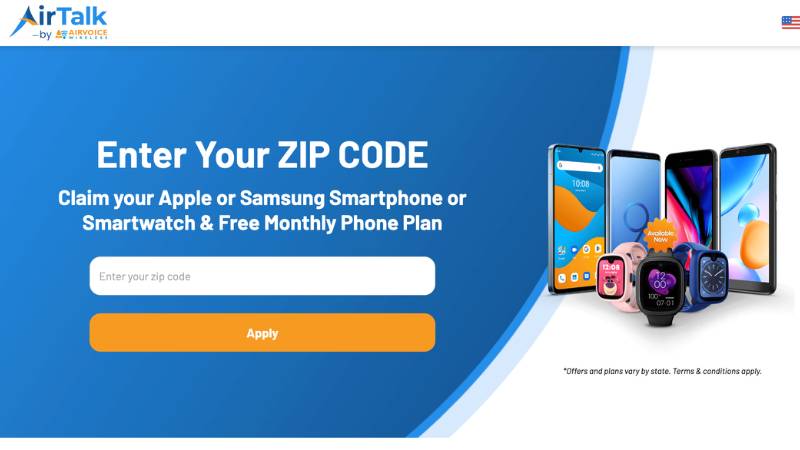
That is where Lifeline-supported wireless service may help reduce monthly expenses through participating providers like AirTalk Wireless.
Compatible plans may include:
- Monthly talk
- Text messaging
- Mobile data
- Bring Your Own Device support
- eSIM activation on supported phones
Because the Pixel 7 already supports eSIM, compatible plans may activate digitally without waiting for a physical SIM card shipment.
Depending on eligibility and availability, some households may also qualify separately for free or discounted smartphone offers.
The application process usually starts online by:
- Entering a ZIP code to check local availability
- Completing the application form
- Uploading proof of eligibility if requested
- Choosing a compatible device or Bring Your Own Device option
- Activating service after approval
Qualification may happen through income eligibility or participation in programs such as Medicaid, SNAP, SSI, or Federal Public Housing Assistance.
8. FAQS
Can Pixel 7 Run Two SIMs at Once?
Yes. The Pixel 7 supports dual SIM functionality through physical SIM + eSIM or dual eSIM configurations on supported carriers.
Does Pixel 7 Need a Physical SIM Card?
No. The phone can activate entirely through eSIM on compatible networks.
Can I Transfer an Existing Number to Pixel 7 eSIM?
Yes. Many carriers allow number transfers directly during eSIM setup or through their apps.
Does Factory Reset Remove Pixel 7 eSIM Profiles?
It can. During a full reset, Android may ask whether to erase installed eSIM profiles or keep them on the device.
9. Conclusion
The Pixel 7 was designed for modern carrier flexibility, combining traditional nano-SIM support with advanced eSIM functionality and dual-line capability.
As more networks continue moving toward digital activation, Google Pixel 7 eSIM support makes switching carriers, managing multiple numbers, and setting up travel plans much easier without relying entirely on physical SIM cards.