Getting a new phone often brings up one simple question: can I put my SIM card in another phone? In many cases, the answer is yes, but there are a few important things to check before making the switch.
Compatibility, carrier requirements, and newer technologies like eSIM can all affect whether the process is as simple as moving the card from one device to another.
This guide explains what happens when you move a SIM card to another phone, can you switch SIM cards between phones safely, when it works, when it doesn’t, and how to make the transition without interrupting your mobile service.
1. Can I Put My SIM Card in Another Phone?
Yes, in most cases, you can put your SIM card in another compatible phone and continue using your existing mobile number and wireless service.
As long as the phone is unlocked or supports your carrier’s network and uses the same SIM card size, the switch is usually quick and straightforward.
If you’re wondering, “can you switch SIM cards between phones“, the answer is also yes. Many people do this when upgrading to a new device, replacing a damaged phone, or temporarily borrowing another phone.
Once the SIM is inserted, the new device should recognize your carrier account, allowing you to make calls, send text messages, and use mobile data.
However, newer phones that use only eSIM technology or older SIM cards that no longer support your carrier’s network may require additional activation before you can use the new device.
2. What Happens When You Put Your SIM Card in Another Phone?
Moving your SIM card changes which phone is connected to your mobile account, but it doesn’t transfer all of your personal data. Here’s what typically happens.
Your Phone Number Moves With the SIM
Your phone number is linked to your carrier account, which is identified by your SIM card. Once you insert the SIM into another compatible phone, your number usually becomes active on that device.
This means friends, family, and coworkers can continue calling and texting you without needing your new phone’s information.
Calls, Texts, and Mobile Data Move Too
Because your SIM authenticates your account on the carrier’s network, your wireless service moves with it.
After the SIM is activated in the new phone, you can generally:
- Make and receive phone calls
- Send and receive text messages
- Access mobile data using your existing plan
If these services don’t work immediately, restarting the phone or checking your carrier’s APN settings may resolve the issue.
Your Photos, Apps, and Files Stay on the Original Phone
A SIM card doesn’t store your photos, videos, downloaded apps, or most personal information.
Those files remain on your original device or in cloud services such as Google Drive, Google Photos, or iCloud. If you’re upgrading phones, you’ll need to transfer or restore that data separately after moving your SIM card.
3. When Can You Move a SIM Card to Another Phone?
In most situations, “can I put my SIM card in another phone” has a simple answer: yes. However, a few requirements need to be met before the switch will work properly.
You can usually move your SIM card if:
- Both phones use the same SIM card size (Nano, Micro, or Standard).
- The new phone is unlocked or compatible with your carrier’s network.
- Your SIM card is active and in good condition.
- Your carrier doesn’t require a replacement SIM when activating the new device.
Many modern smartphones allow you to swap SIM cards in just a few minutes without contacting your carrier. However, some carriers may ask you to activate the new device or register its IMEI before service begins.
If your new phone supports only eSIM or uses a different network technology, you’ll likely need additional setup instead of simply moving the physical SIM card.
4. When You Shouldn’t Move Your SIM Card
Although swapping SIM cards is common, there are situations where it isn’t the best option.
You’re Switching to an eSIM-Only Phone
Some newer smartphones no longer include a physical SIM tray. For example, U.S. models of recent iPhones support eSIM only.
If your new phone doesn’t accept a physical SIM card, you’ll need to transfer your service by activating an eSIM through your carrier instead.
Your SIM Card Is Too Old
Older SIM cards may not support newer network technologies, including 5G.
If your SIM has been in use for many years, your carrier may recommend replacing it to improve compatibility, security, and network performance.
Your Carrier Requires a New SIM
Some carriers require a new SIM card when activating a different phone, especially if you’re changing account types, switching network technologies, or replacing a lost or damaged SIM.
If your existing SIM doesn’t activate successfully in the new device, contact your carrier to determine whether a replacement SIM or eSIM is required.
5. How to Switch Your SIM Card to Another Phone
If you’re wondering can I put my SIM card in another phone without losing service, the process is usually straightforward. Taking a few simple steps before powering on the new device can help avoid connection issues.
Turn Off Both Phones
Power off both your old and new phones before removing the SIM card. This helps prevent potential read errors and protects the SIM while it’s being transferred.
If either phone has a removable battery, make sure the device is completely powered down before opening the SIM tray.
Move the SIM Card
Use a SIM eject tool or a small paper clip to open the SIM tray on your old phone. Carefully remove the SIM card and insert it into the corresponding tray on your new device.
Make sure:
- The SIM card is the correct size for the new phone.
- The card is seated properly in the tray.
- The phone supports your carrier’s network.
Once everything is in place, power on the new phone and allow it a few moments to detect the SIM.
Test Calls, Texts, and Mobile Data
After your phone finishes connecting to the network, verify that your service is working properly.
Try to:
- Make a phone call.
- Send and receive a text message.
- Turn off Wi-Fi and confirm that mobile data works.
If your phone doesn’t recognize the SIM or connect to the network, restart the device first. If the issue continues, contact your carrier to confirm that your SIM is activated and compatible with your new phone.
6. Need a New SIM Card or eSIM for Your New Phone?
Sometimes moving your existing SIM card isn’t enough. If your new phone supports only eSIM, your SIM card is outdated, or your carrier requires a replacement, you’ll need to activate a new SIM or eSIM before using your device.
If you’re also looking for affordable wireless service, the federal Lifeline program may help eligible households save on monthly phone service.
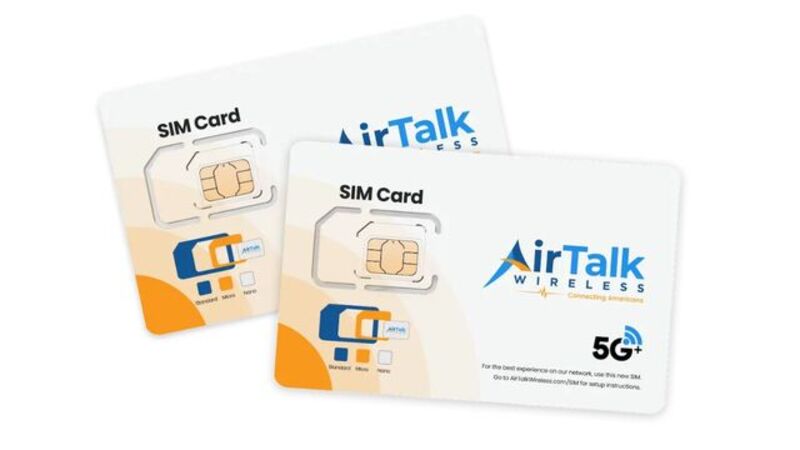
As a participating Lifeline provider, AirTalk Wireless offers qualifying customers affordable wireless plans and, depending on eligibility and available inventory, the option to receive a discounted smartphone with a physical SIM or eSIM when supported by the device.
Getting started is simple:
- Visit the AirTalk Wireless website.
- Enter your ZIP code and select Apply Now.
- Choose the Lifeline plan that fits your needs.
- Select an available smartphone if eligible.
- Verify your eligibility and submit any required documents.
- Complete activation once your SIM or eSIM is ready.
Whether you’re upgrading your phone or replacing an old SIM card, activating the correct SIM technology helps ensure reliable calls, texts, and mobile data.
Read more: How Many GB Do You Need SIM Card? Find the Right Plan for Your Needs
7. FAQs
Can I put my SIM card into any unlocked phone?
Usually, yes. As long as the phone supports your carrier’s network and uses the correct SIM card size, your SIM should work after activation.
Will I lose my contacts if I switch my SIM card?
Not if your contacts are stored on your phone or synced with Google Contacts or iCloud. Only contacts saved directly to the SIM card move with it.
Can I switch my SIM card back to my old phone?
Yes. In most cases, you can move the SIM back to your previous compatible phone and continue using your existing service.
Do I need to contact my carrier before switching phones?
Usually not. However, some carriers require activation for certain devices or when switching to an eSIM-only phone.
8. Conclusion
In most situations, the answer to can I put my SIM card in another phone is yes. As long as your new phone is compatible with your carrier and supports your SIM, you can usually keep your phone number and mobile service by simply moving the card. If your new device requires a replacement SIM or eSIM, checking your carrier’s requirements beforehand can help make the transition quick and hassle-free.