Is iPhone 14 eSIM only in every country? Not exactly. Many buyers discover the answer only after trying to insert a physical SIM card or switch carriers for the first time.
The confusion usually comes from the major SIM difference between U.S. and international iPhone 14 models. Some versions work entirely through eSIM, while others still support a physical SIM card alongside digital activation.
1. Is iPhone 14 eSIM Only? The Direct Answer
Yes, but only for certain versions of the iPhone 14.
The answer to is iPhone 14 eSIM only depends on where the device was purchased. Apple handles SIM support differently between U.S. and international models, which is why many buyers become confused during activation or carrier switching.
U.S. Models: Yes, eSIM Only
iPhone 14 models sold in the United States do not include a physical SIM card tray.
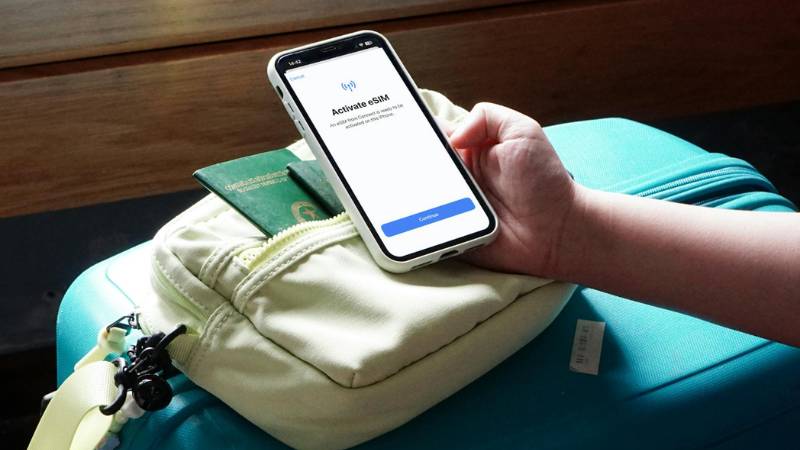
Instead, Apple designed these versions to work entirely through eSIM technology. Users activate cellular service digitally by downloading a carrier plan directly to the phone.
This means U.S. iPhone 14 models:
- Do not support physical SIM cards
- Require eSIM-compatible carriers
- Use digital activation for setup and number transfers
For many users, this removes the need to insert or swap physical SIM cards when changing carriers.
International Models: No, Dual SIM Support
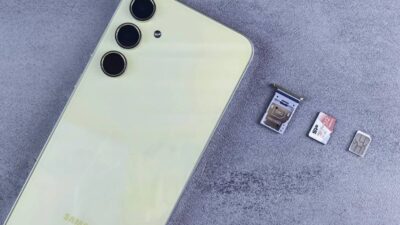
Many international iPhone 14 models still include a physical SIM tray.
These versions usually support:
- One physical SIM
- One eSIM
- Dual SIM functionality
Because of this difference, international users often have more flexibility when traveling or switching between carriers that still rely on traditional SIM cards.
Before buying an iPhone 14, it is important to confirm whether the device is a U.S. or international version because the SIM setup experience can be very different.
2. Why is iPhone 14 eSIM Only in the US?
When discussing whether iPhone 14 supports only eSIM, many users also wonder why Apple decided to remove the physical SIM tray from U.S. models in the first place.
Apple introduced the eSIM-only design in the United States to simplify activation and move further toward fully digital carrier setup. Instead of inserting a SIM card, users can activate a plan directly through their carrier using eSIM.
Apple also promoted several potential benefits of eSIM technology, including:
- Faster carrier activation
- Easier number transfers
- Better security if the phone is lost or stolen
- More internal device space without a SIM tray
At the same time, the transition created confusion for users switching from older iPhones or carriers that still rely heavily on physical SIM cards.
This is especially important for travelers and international buyers because many regions outside the United States still use physical SIM cards more frequently than eSIM activation.
3. How Many eSIMs Can iPhone 14 Have at Once?
Another common question related to is iPhone 14 eSIM only involves how many eSIM profiles the device can actually store and use.
The iPhone 14 can store multiple eSIM profiles at the same time, allowing users to switch between different carriers or phone numbers without inserting a physical SIM card.
However, active line limits depend on the device version.
- U.S. iPhone 14 models can use two active eSIMs simultaneously
- International models may support one physical SIM and one active eSIM
This setup can be useful for:
- Separate work and personal numbers
- International travel
- Temporary carrier switching
- Backup data plans
Users can manage eSIM settings directly through the iPhone Settings app without needing a physical SIM tray.
4. How to Set Up eSIM on Your iPhone 14
After learning is iPhone 14 eSIM only for U.S. models, the next step is understanding how activation actually works. Apple allows several ways to add an eSIM depending on your carrier and device setup.
Option 1: Scan a Carrier QR Code
Many carriers provide a QR code for eSIM activation.
To use this method:
- Open Settings
- Tap Cellular
- Select Add eSIM
- Choose Use QR Code
- Scan the code provided by your carrier
Once completed, the iPhone downloads the cellular plan digitally without requiring a physical SIM card.
Option 2: Use Your Carrier’s App
Some carriers allow direct eSIM setup through their mobile app.
In many cases, users simply:
- Download the carrier app
- Sign into their account
- Follow the activation prompts
- Install the eSIM automatically
This method is common with newer carriers that support fully digital activation.
Option 3: Transfer eSIM from an Old iPhone
Apple also allows eSIM transfer between compatible iPhones during setup.
If both devices support eSIM and run compatible iOS versions, users may transfer their number directly during the Quick Start process.
This option can make upgrading to an iPhone 14 much easier without contacting the carrier manually.
Read more: Step-by-Step Guide: Best Free Government eSIM for iPhone
5. Quick Fixes for Common eSIM Issues on iPhone 14
Even though eSIM activation is usually straightforward, setup problems can still happen during carrier transfer or initial activation.
eSIM Won’t Download
If the eSIM profile fails to download:
- Check your Wi-Fi connection
- Restart the iPhone
- Confirm carrier eSIM support
- Update to the latest iOS version
Some activation issues also happen when the device is still carrier locked.
“No Cellular Plan Available” Error
This error often appears when:
- The QR code has expired
- The carrier has not completed activation
- The eSIM was removed previously
- The device is incompatible with the carrier
Contacting the carrier for a new activation code may solve the issue.
Lost eSIM After Factory Reset
Factory resetting an iPhone can sometimes remove the installed eSIM profile.
After reset, users may need to:
- Re-download the eSIM
- Scan the QR code again
- Contact the carrier for reactivation
Some carriers allow automatic recovery through their mobile app, while others require manual setup again.
6. FAQS
Is iPhone 14 eSIM Only in the United States?
Yes. U.S. iPhone 14 models do not include a physical SIM tray and only support eSIM activation.
Can iPhone 14 Use a Physical SIM Card?
International iPhone 14 models sold outside the United States may still support one physical SIM card along with eSIM functionality.
Can I Switch Carriers on an eSIM-Only iPhone 14?
Yes. Users can switch carriers digitally through eSIM as long as the iPhone is unlocked and the new carrier supports eSIM activation.
Does iPhone 14 Support Dual SIM?
Yes. U.S. models support dual eSIM, while many international models support one physical SIM and one eSIM.
7. Conclusion
Is iPhone 14 eSIM only depends on which version of the device you buy. U.S. models work entirely through eSIM, while many international versions still include physical SIM support alongside digital activation.
Before switching carriers or purchasing a device, it helps to confirm whether your iPhone 14 is a U.S. or international model so you can choose the right activation method and carrier setup.