Getting a free iPhone from the government is something many people look for, but the reality is often misunderstood. Not every offer you see online is legitimate, and the availability of iPhones depends on specific programs and providers.
This guide will break down how it actually works, what to expect, and how to find real options that may help you get an iPhone at little to no cost. Keep reading.
1. Can You Get a Free iPhone From the Government?
Yes. You can get a free iPhone from the government through programs like Lifeline, which is a federal phone assistance program for low-income households.
Lifeline does not directly give out phones. Instead, it provides a monthly discount on your mobile service, and approved providers use that support to offer free plans and promotional smartphones, including iPhones.
With Lifeline, you may receive:
- Up to $9.25 per month toward your phone service
- Up to $34.25 per month if you live on Tribal lands
These benefits help reduce costs and allow providers to offer:
- Free monthly talk, text, and data
- Free SIM card or eSIM activation
- Free shipping
- Free smartphones or discounted iPhone upgrades
Lifeline is available in all U.S. states. You only need to meet the eligibility requirements and apply through a participating provider.
Once approved, you can activate your service quickly and, depending on availability, receive a free iPhone or choose a discounted upgrade option.
2. Who Qualifies for a Free Government Phone Right Now?
You can get a free iPhone from the government if you meet the eligibility requirements under the Lifeline program. There are two main ways to qualify, and you only need to meet one.
1. Income-Based Eligibility
You qualify if your household income is at or below 135% of the Federal Poverty Guidelines (FPG).
- This rule applies across all U.S. states
- Income limits vary based on household size
2. Program-Based Eligibility
You also qualify if you currently receive benefits from any of the following programs:
Tribal program eligibility includes:
- Tribal TANF
- Bureau of Indian Affairs (BIA) General Assistance
- FDPIR (Food Distribution Program on Indian Reservations)
If you live on Tribal lands, you may receive a higher monthly benefit.
3. Documents for Approval (If Required)
In many cases, your eligibility is verified automatically. However, you should prepare documents in case manual verification is needed:
- Government-issued ID (State ID, driver’s license, Tribal ID, passport)
- Benefit approval letter (Medicaid, SNAP, SSI, or other qualifying program)
- Proof of address (Utility bill, lease, or official letter)
4. Tips to Avoid Delays
A few simple steps can help you get approved faster:
- Upload clear and readable images
- Make sure your name matches across all documents
- Use valid and up-to-date benefit letters
- Avoid cropped or blurry photos
Following these guidelines helps speed up approval so you can start using your free service and device as soon as possible.
3. Where to Apply for a Free Government Phone Easily Today?
Many people searching for a free iPhone from the government want a simple and reliable way to apply. The most straightforward path is through an approved Lifeline provider, and the experience can vary depending on who you choose.
When comparing providers, most users care about:
- Fast approval
- Stable network coverage
- Reliable monthly service
- Availability of iPhones or upgrade options
- A simple online application process
3.1. Find the Top Lifeline Provider
Among available options, AirTalk Wireless stands out as one of the most widely used providers for Lifeline services.
It offers nationwide coverage and a streamlined application process, making it easier for eligible users to get started without unnecessary steps.
Instead of dealing with complex sign-ups or long wait times, users can apply online and receive updates quickly..
3.2. What You Actually Receive Through AirTalk Wireless
AirTalk Wireless focuses on delivering a complete setup rather than just a basic phone plan. Depending on your location and eligibility, you may receive:
- Free monthly service with talk, text, and data
- Free smartphones when inventory is available
- Discounted upgrades on newer devices, including recent iPhone models
- Free SIM card or eSIM activation
- Tablet options at no cost or reduced prices
- Fast online application with quick verification
- Free shipping in most areas, typically within a few days
- No activation fees
- Order tracking after approval
- International calling support to over 200 countries
These features make it easier to move from application to active service without delays. Instead of handling separate steps for SIM, plan, and device, everything is included in one process.
For users looking to get a free iPhone from the government, applying through a provider like AirTalk Wireless is often the fastest and most practical way to start.
Read more: Can You Really Get a Free iPhone 16 Pro Max Government Phone? What to Know First
4. How to Get a Free iPhone From the Government
If you are wondering how can i get a free iPhone from the government, the process is more straightforward than most people expect. You apply through the Lifeline program and complete a few steps to receive service and a device.
Here is how to get a free iPhone from the government safely and quickly:
Step 1 – Confirm Your Eligibility Through the National Verifier
Start by checking your eligibility using the National Verifier system.
- Enter your basic information
- The system checks your income or program status
- Many users are approved instantly if records match
This step determines whether you qualify before moving forward.
Step 2 – Visit AirTalkWireless.com and Enter Your ZIP Code
Go to the AirTalk Wireless website and enter your ZIP code.
- Your location determines available plans and devices
- You will see options specific to your area
This step ensures you only see offers you can actually receive.
Step 3 – Select Your Lifeline Plan
Choose a plan that fits your needs.
- Plans include free talk, text, and data
- Data amounts may vary by state or region
At this stage, you are selecting the service that supports your device.
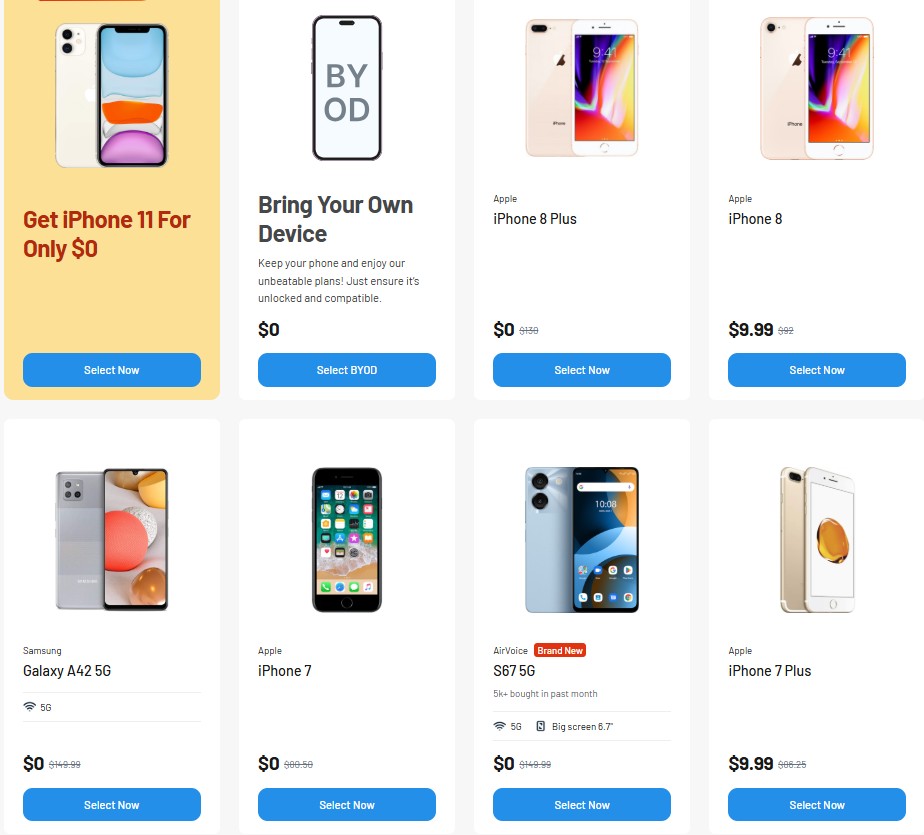
Step 4 – Choose a Free or Discounted iPhone
Depending on availability, you can select a device during the application.
Common free iPhone options include:
Common discounted upgrade options include:
- iPhone 12 Mini
- iPhone 12 Pro
- iPhone 12 Pro Max
- iPhone 13
- iPhone 13 Mini
- iPhone 13 Pro
- Airtalk Wireless Free iPhone 13 Pro Max
- iPhone SE 3 (2022)
- iPhone 14 Series
- iPhone 15 Series
You choose the phone during the device selection step.
Step 5 – Upload Your ID and Benefit Documents
Most applications are verified automatically. If not, you may need to upload:
- Government-issued ID
- Benefit approval letter (Medicaid, SNAP, SSI, etc.)
- Proof of address
Make sure your documents are clear and match your application details.
Note: Most documents verify automatically. Upload only if the system cannot confirm your information.
Step 6 – Submit Your Application
After completing all steps:
- Click submit
- Wait for approval
Many users receive approval within minutes when verification is automatic.
Step 7 – Receive Your Device or Activate Your Free eSIM
Once approved, you will receive:
- A free eSIM for instant activation, or
- A physical SIM and phone shipped to your address
Delivery typically takes a few days.
Step 8 – Start Using Your Service
After activation:
- Your service is ready to use
- You can make calls, send texts, and use data immediately
This completes the process of getting a free iPhone from the government through a verified provider.
>>> Read more: Get a Free iPhone Today: The Fastest Way to Get One at $0
Final Words
You now see how you can get a free iPhone from the government through a simple and safe process. The key is meeting Lifeline rules, choosing a trusted provider, and submitting clean documents for fast approval.
Once your application goes through, you can start using free service and receive your device or eSIM without fees.
If you are ready to check your eligibility and see which iPhones are available today, continue to the next section and begin your application.