Getting ready to activate an eSIM only to discover that your phone or carrier is not supported can be frustrating. A few minutes of verification beforehand can prevent activation errors, failed downloads, and unnecessary customer support calls.
An eSIM compatibility check is designed to answer a simple question: can your device actually use eSIM service on your chosen network? The process involves more than checking the phone model alone.
Device hardware, carrier support, IMEI eligibility, and eSIM settings all play a role in determining whether activation will work successfully.
1. What Does an eSIM Compatibility Check Actually Include?
Many people assume an eSIM compatibility check only verifies whether a phone model supports eSIM. In reality, several factors must align before activation can succeed.
A phone can support eSIM hardware and still fail activation if the carrier, device status, or account requirements are not compatible.
Device Hardware Support
The first part of any eSIM compatibility check is confirming that the device includes eSIM hardware.
Common indicators include:
- An EID number
- An Add eSIM option in settings
- Manufacturer documentation listing eSIM support
Examples of eSIM-compatible devices include:
- iPhone XR and newer
- Samsung Galaxy S20 and newer
- Google Pixel 3 and newer
- Selected Motorola and OnePlus models
If the device lacks eSIM hardware, activation will not be possible regardless of carrier support.
Carrier Network Support
The second step is verifying that the carrier supports eSIM on the specific device.
Some providers:
- Support eSIM only on certain models
- Restrict activation on imported devices
- Require unlocked phones
- Support eSIM in some regions but not others
This is why a carrier compatibility check is just as important as verifying the phone itself.
IMEI and EID Verification
Many providers use the phone’s IMEI number to determine eligibility.
During an eSIM compatibility check, the carrier may verify:
- Device model
- Network compatibility
- Activation eligibility
- Unlocked status
Some providers also reference the EID number, which serves as the unique identifier for the phone’s eSIM hardware.
If both the IMEI and EID pass verification, activation is much more likely to proceed smoothly.
2. 4 Quick Step Method to Confirm Your Device
Instead of guessing whether a phone supports eSIM, follow these four checks before attempting activation.
Step 1: Check If Your Device Supports eSIM
Start with the manufacturer specifications.
You can also look for:
- EID information
- Add eSIM settings
- Carrier support documentation
This immediately eliminates devices that lack eSIM hardware entirely.
Step 2: Check Carrier Support Before You Apply
A successful eSIM compatibility check requires carrier support as well as device support.
Before enrolling with a provider:
- Review supported devices
- Check Bring Your Own Device requirements
- Verify eSIM availability
- Confirm regional support if applicable
Doing this first can prevent activation delays later.
Step 3: Is My IMEI Compatible with eSIM?
Many carriers provide online IMEI verification tools.
To find your IMEI:
iPhone
- Settings
- General
- About
Android
- Settings
- About Phone
or dial: *#06#
The carrier can use the IMEI to determine whether the device can be activated on its network.
Step 4: Confirm via Your Phone’s Settings
The final step is checking the phone itself.
On iPhone:
- Open Settings
- Tap General
- Select About
- Look for EID
You can also navigate to Settings > Cellular, and look for: Add eSIM.
On Android:
- Open Settings
- Navigate to SIM settings or SIM Manager
- Look for:
- Add eSIM
- Download SIM
- eSIM Manager
If these options are available, the device is likely ready for eSIM activation. Completing this final verification step provides the clearest answer during an eSIM compatibility check and helps avoid surprises during setup.
3. How a Trusted Lifeline Provider Simplifies eSIM Compatibility Check
An eSIM compatibility check can feel confusing because device support depends on more than just the phone model. Carrier restrictions, regional versions, locked devices, and manufacturer-specific limitations can all affect whether activation will work.
This is where dedicated compatibility tools become useful.
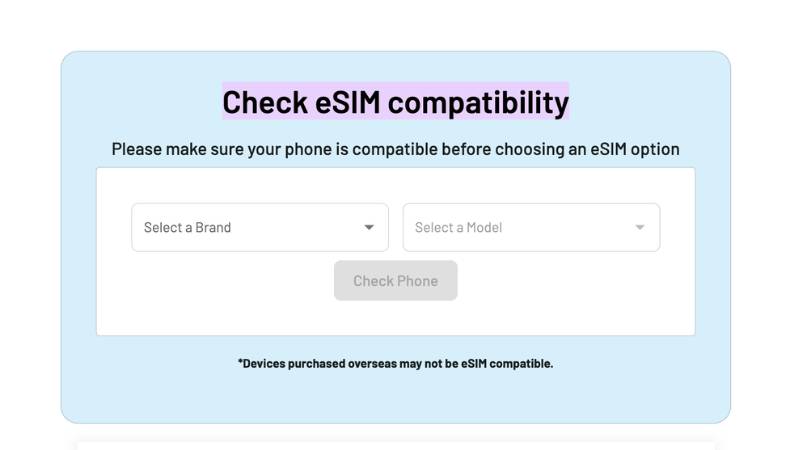
For example, AirTalk Wireless provides a Check eSIM Compatibility tool that allows users to quickly verify whether their device is eligible before applying for service.
Instead of searching through specification sheets or carrier support pages, users can simply select:
- Device brand
- Device model
The tool then checks whether the phone supports eSIM activation.
This is especially helpful because not every version of the same phone supports eSIM.
AirTalk notes that while many devices manufactured after 2020 support eSIM or Dual SIM functionality, some phones purchased internationally may not include eSIM capability. In addition, the device must generally be unlocked before eSIM activation can proceed.
Besides this eSIM compatibility check, you may want to check the eSIM services provided by this Lifeline carrier.
You may qualify for the Lifeline program and apply through AirTalk Wireless to receive a free eSIM equipped with zero-cost monthly data and many other perks.
Read more: SIM ME Lock Code Explained: How to Get the Right One (2026)
4. FAQs
Is My iPhone eSIM Compatible?
Most iPhones released since the iPhone XR, iPhone XS, and iPhone XS Max support eSIM. You can verify compatibility by checking for an EID number in Settings > General > About or looking for an Add eSIM option under Cellular settings.
Can I Check eSIM Compatibility Without Contacting My Carrier?
Yes. Many carriers and providers offer online compatibility tools that allow you to verify support using your phone model or IMEI number before beginning activation.
Does an Unlocked Phone Automatically Support eSIM?
No. A phone can be unlocked and still lack eSIM hardware. Device compatibility and carrier unlock status are two separate requirements.
Why Does My Phone Have an EID but Still Fail Activation?
An EID confirms the presence of eSIM hardware, but activation can still fail if the carrier does not support the device, the IMEI is ineligible, or the account has activation restrictions.
5. Conclusion
A successful eSIM compatibility check involves more than confirming that a device supports eSIM technology. Carrier support, IMEI eligibility, unlock status, and phone-specific settings all play important roles in determining whether activation will succeed.
Taking a few minutes to verify compatibility before applying for service can prevent activation delays and unnecessary troubleshooting. Whether you use your carrier’s verification system or a dedicated tool such as AirTalk’s eSIM Compatibility Checker, confirming support in advance is one of the easiest ways to ensure a smoother eSIM activation experience.