If you’re planning to switch to a digital SIM, one of the first things to check is which iPhones support eSIM. Not every model includes this feature, and support can vary depending on the device and region.
Whether you’re upgrading your phone or switching carriers, knowing which iPhones are compatible with eSIM will help you avoid setup issues and make the transition much smoother.
1. Which iPhones Support eSIM: Full List
Here are all iPhone models that support eSIM:
- iPhone XS
- iPhone XS Max
- iPhone XR
- iPhone 11
- iPhone 11 Pro
- iPhone 11 Pro Max
- iPhone SE (2nd generation)
- iPhone 12 mini
- iPhone 12
- iPhone 12 Pro
- iPhone 12 Pro Max
- iPhone 13 mini
- iPhone 13
- iPhone 13 Pro
- iPhone 13 Pro Max
- iPhone SE (3rd generation)
- iPhone 14
- iPhone 14 Plus
- iPhone 14 Pro
- iPhone 14 Pro Max
- iPhone 15
- iPhone 15 Plus
- iPhone 15 Pro
- iPhone 15 Pro Max
- iPhone 16 series (all models)
- iPhone 17 series (latest models)
2. Do All iPhones Support eSIM? (Important Notes)
Not all iPhones come with eSIM capability, and there are a few important details to keep in mind.
First, iPhone 8 and earlier models do not support eSIM. These devices rely entirely on physical SIM cards, so you won’t find any digital SIM option in the settings.
Second, regional differences can affect eSIM availability. Some iPhones sold in specific countries may include dual physical SIM slots instead of eSIM functionality. This is why two identical models might behave differently depending on where they were purchased.
Finally, carrier support is essential. Even if your iPhone is compatible, eSIM won’t work unless your mobile provider enables it. Some carriers still limit eSIM features or require additional activation steps.
In short, having a supported iPhone is only part of the equation. You also need the right carrier and region compatibility.
3. eSIM Support by iPhone Generation
Understanding which iPhones support eSIM across different generations makes it easier to see what your device is capable of and whether you can use a digital SIM.
Early eSIM iPhones
The first iPhones to introduce eSIM were:
- iPhone XS
- iPhone XS Max
- iPhone XR
These models marked the beginning of Apple’s shift toward digital SIM technology. At this stage, eSIM worked alongside a physical SIM, allowing users to run dual SIM (one physical + one digital).
iPhone SE Models
Apple later brought eSIM support to its more affordable lineup: iPhone SE 2nd and 3rd generations.
These models support eSIM while maintaining a physical SIM slot, making them a practical option for users who want flexibility without upgrading to a flagship device.
iPhone 11 to iPhone 13 Series
From iPhone 11 through iPhone 13, eSIM became more stable and widely used.
- Supports dual SIM (1 physical SIM + 1 eSIM)
- Improved carrier compatibility
- Easier switching between plans
These generations made eSIM more accessible to everyday users, especially those managing work and personal numbers on one device.
iPhone 14 and Newer Models
Starting with the iPhone 14 lineup, Apple made a major shift, especially in the U.S. market:
- U.S. models are eSIM-only (no physical SIM tray)
- Support dual eSIM at the same time
- Faster activation and easier plan switching
Newer models like iPhone 15, 16, and 17 continue this trend. This signals a future where physical SIM cards are gradually phased out.
>>> Also read: Last iPhone with SIM Card: Why Apple Dropped the Physical SIM Slot
4. How to Check eSIM Availability on Your iPhone
If you’re unsure which iPhones support eSIM and whether your phone use eSIM, you can check directly in your settings by following these steps:
- Open Settings
- Tap Cellular or Mobile Data
- Look for options like Add eSIM or Add Cellular Plan
If you see these options, your iPhone supports eSIM.
You can also check by going to:
- Settings > General > About
- Scroll down and look for Digital SIM or eSIM-related information
Another quick way is to remove your physical SIM card. If your phone still shows a signal or an active plan, it’s likely using an eSIM.
These simple checks help confirm compatibility without needing technical knowledge.
5. Get a FREE or Discounted eSIM-compatible iPhone with AirTalk Wireless
If you don’t currently have a compatible device, upgrading doesn’t always mean paying full price. This is where Lifeline providers can help.
The Lifeline program is a government-supported benefit designed to help low-income households stay connected by reducing the cost of phone and internet service.
Instead of offering service directly, Lifeline works through approved providers. These providers deliver the core benefit, free or discounted monthly plans, and may also expand the value with additional perks.
AirTalk Wireless is one of these participating providers. Its primary offering is free or low-cost service plans that include talk, text, and data for eligible users.
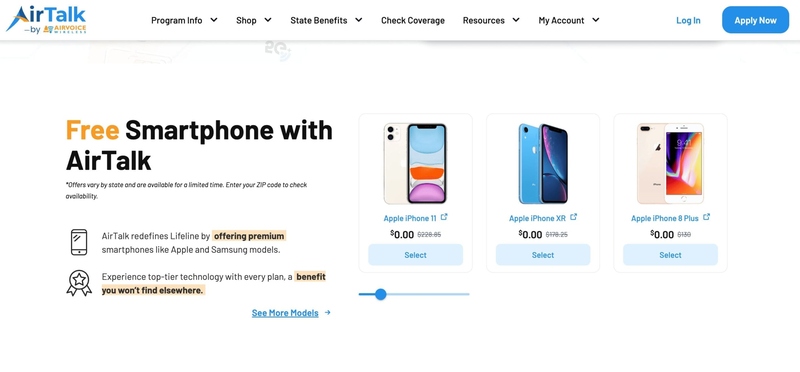
In addition to these plans, AirTalk may provide discounted or free smartphones as a limited-time or promotional offer, depending on availability.
So, which iPhones support eSIM that you can get through AirTalk Wireless? Here are some commonly available models:
- iPhone 11
- iPhone 12 series
- iPhone SE (2nd or 3rd generation)
- iPhone 13 (availability may vary)
These devices are well-suited for everyday use and fully support eSIM functionality.
So, who is eligible? You may qualify for Lifeline benefits if:
- Your income meets federal or state eligibility thresholds
- You participate in programs like SNAP, Medicaid, SSI, or Federal Public Housing Assistance
Eligibility rules can vary slightly by state, so it’s important to check your status directly.
Visit AirTalk Wireless today to check your eligibility and apply. You could get a free plan and an eSIM-compatible iPhone without paying full price.
6. FAQs
What is the oldest iPhone to have eSIM?
The first iPhones to support eSIM were the iPhone XS, iPhone XS Max, and iPhone XR, released in 2018. These models introduced dual SIM functionality by combining a physical SIM card with a digital eSIM, allowing users to manage two lines on one device.
Which iPhone model does not support eSIM?
All iPhone models released before the iPhone XS series do not support eSIM technology. This includes devices like the iPhone X, iPhone 8, and earlier versions, which rely entirely on physical SIM cards for network connectivity and carrier activation.
Can the iPhone 13 use eSIM?
Yes, the iPhone 13 fully supports eSIM and even allows dual eSIM functionality in some cases. Users can activate one or more eSIM profiles without needing a physical SIM card.
Does iPhone 17 have eSIM or physical SIM?
iPhone 17 models support eSIM technology, continuing Apple’s shift toward a more digital SIM experience. In the United States, these devices may be eSIM-only, meaning they no longer include a physical SIM tray at all.
Is there a free eSIM service for iPhone?
While eSIM technology itself is not free, some mobile providers offer free or heavily discounted service plans that include eSIM activation. For example, eligible users may receive no-cost plans through Lifeline providers, making it easier to access eSIM without additional fees.
Final Thoughts
Knowing which iPhones support eSIM makes it easier to choose the right device and avoid compatibility issues when switching plans. As newer models move toward eSIM-only setups, this feature is quickly becoming standard.
If you’re ready to upgrade, AirTalk Wireless offers a simple way to get an eSIM-compatible iPhone at little to no cost. Check your eligibility and apply today to get started.