A tablet becomes a lot more useful when it doesn’t depend on Wi-Fi.
Whether you’re working remotely, traveling, attending classes, or simply want internet access wherever you go, a cellular-enabled tablet can keep you connected without hunting for public networks.
If you’re shopping for a tablet with SIM card support, you’ll quickly discover there are more options than ever. Some models use a traditional SIM card, others support eSIM, and the available features can vary significantly depending on the device.
1. Best Tablet With SIM Card Models in 2026
The best tablet for you depends largely on how you plan to use it. Some users prioritize performance and productivity, while others simply want reliable internet access away from Wi-Fi.
Here are some of the strongest options available this year.
iPad Pro and iPad Air
For many buyers, Apple’s iPad lineup remains the benchmark.
The cellular versions of the iPad Pro and iPad Air support mobile connectivity through SIM cards, eSIM, or both, depending on the model and region. They offer excellent battery life, strong performance, and access to one of the most mature tablet app ecosystems available.
These models are particularly well suited for:
- Remote work
- Creative professionals
- Students
- Frequent travelers
The main drawback is price, especially when adding accessories such as keyboards and Apple Pencil.
Samsung Galaxy Tab S Series
Samsung’s flagship tablets continue to be among the strongest Android alternatives.
The Galaxy Tab S lineup combines premium displays, powerful processors, and optional 5G connectivity, making them attractive for users who prefer Android.
Popular use cases include:
- Business productivity
- Streaming and entertainment
- Mobile gaming
- Multi-device Samsung ecosystems
Many models support both physical SIM cards and eSIM functionality depending on the market.
Lenovo Tab and Mid Range Picks
Lenovo offers several solid options for users who want cellular connectivity without flagship pricing.
Many Lenovo tablets focus on balancing affordability with practical features such as LTE connectivity, long battery life, and large displays.
For users who primarily browse the web, attend online classes, stream content, or work remotely, Lenovo’s mid-range lineup often provides strong value.
Affordable Tablets With LTE
Not everyone needs a premium device.
Several budget-friendly tablets support LTE connectivity and can handle everyday tasks such as:
- Video calls
- Web browsing
- Navigation
- Streaming
These models may not offer flagship performance, but they can be a cost-effective way to stay connected while traveling or working away from Wi-Fi.
2. Physical SIM vs eSIM Tablets: Which Should You Buy
The answer depends on how you plan to use the device.
Physical SIM tablets remain familiar and widely supported. You simply insert a SIM card and activate service. For users who frequently switch carriers or move SIM cards between devices, this flexibility can still be useful.
eSIM tablets, on the other hand, eliminate the need for a removable card entirely. Activation is handled digitally through a carrier app or QR code, which can make setup faster and more convenient.
In general:
| Physical SIM | eSIM |
| Familiar setup process | Digital activation |
| Easy to swap between devices | No physical card to lose |
| Broad carrier support | Convenient for travel |
| Requires SIM tray | Supports multiple profiles on many devices |
For most buyers purchasing a new tablet, eSIM support is becoming increasingly valuable because more carriers and manufacturers are moving in that direction.
3. What to Check Before You Buy a Tablet With SIM Card
Before choosing a cellular tablet, there are a few important factors worth verifying.
- Carrier compatibility should be at the top of the list. Not every tablet supports every network, especially if you’re purchasing an international model. Confirm that the device works with your preferred carrier before buying.
- Data plan pricing is equally important. Sometimes the monthly service cost ends up being more significant than the tablet itself over the long run. Compare available plans and determine whether you’ll need a dedicated tablet plan or can share data from an existing account.
- 5G support and coverage can also make a noticeable difference. If you frequently work outside the home or travel regularly, a tablet with strong 5G compatibility may provide faster and more reliable connectivity. However, 5G performance ultimately depends on carrier coverage in the places where you’ll actually use the device.
Taking a few minutes to verify these details upfront can help you avoid compatibility issues, activation headaches, and unexpected monthly costs later.
4. Pair Your Tablet With a Truly Free Data Plan (For Eligible Households)
Buying a cellular tablet is only part of the equation. You’ll also need a data plan, and over time those monthly charges can add up quickly.
For eligible individuals and households, there may be a more affordable option.
AirTalk Wireless is a wireless service provider that participates in the federal Lifeline program, which helps qualifying consumers access affordable phone and internet service.
Depending on eligibility, location, and current offers, users may qualify for free or low-cost service with monthly data benefits.
If you already own a compatible tablet, especially one that supports eSIM or cellular connectivity, it’s worth checking whether you qualify before signing up for a traditional carrier plan.
Step 1: Confirm Your Eligibility
You may qualify based on household income or participation in certain government assistance programs, such as:
- SNAP
- Medicaid
- SSI
- Federal Public Housing Assistance
- Veterans Pension and Survivors Benefit
Step 2: Check Service Availability
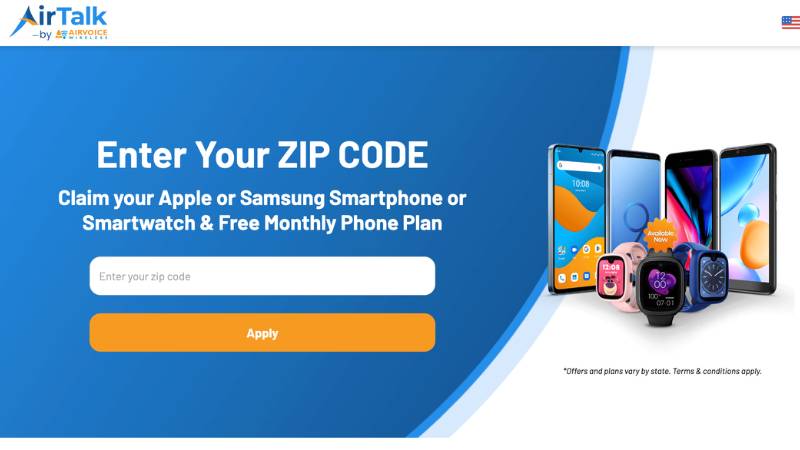
Visit the AirTalk Wireless website and enter your ZIP code to verify that service is available in your area.
Step 3: Review Available Plans
Available plans and benefits can vary by location and eligibility status. Take a few minutes to compare the available options and determine which plan best fits your data needs.
Step 4: Complete the Application
Submit your application online and upload any required documents to verify eligibility.
This may include proof of identity, proof of income, or documentation showing participation in a qualifying assistance program.
Step 5: Activate Service
Once approved, follow the activation instructions provided by AirTalk Wireless.
Depending on your device and plan, activation may be completed through a physical SIM card or eSIM.
For users who rely on their tablet for work, school, streaming, or everyday internet access, checking eligibility could be a worthwhile first step before committing to another monthly bill.
Read more: How to Activate eSIM: The Effortless Step-by-Step Guide for iPhone and Android (2026)
5. FAQs
Can any tablet use a SIM card?
No. Only cellular-enabled tablets support SIM cards or eSIM connectivity. Wi-Fi-only models cannot connect directly to mobile networks.
Is a tablet with a SIM card worth it?
For users who travel frequently, work remotely, or need internet access away from Wi-Fi, a cellular tablet can provide much more flexibility than a Wi-Fi-only model.
Can I use my phone SIM card in a tablet?
Sometimes. It depends on your carrier’s policies and whether the tablet supports the same network technologies. Some carriers restrict phone plans from being used in tablets.
Do tablets with SIM cards require a separate data plan?
In many cases, yes. However, some carriers offer shared-data plans that allow tablets to use data from an existing account.
6. Conclusion
A tablet with SIM card support can give you the freedom to stay connected almost anywhere, whether you’re working, studying, traveling, or streaming on the go.
Hopefully, this guide has helped narrow down the best options for your budget and shown you what features are actually worth paying for. Before buying, take a moment to compare connectivity options, carrier compatibility, and long-term data costs so you end up with a tablet that fits both your needs and your budget.